This week, security researchers reported a campaign involving malicious AI/ChatGPT-themed Chrome extensions that were stealing AI chat content (ChatGPT/DeepSeek prompts and responses) and related browsing/session data. The reported scale is significant — potentially impacting up to 900,000 users.
This isn't theoretical or "maybe".
We've now confirmed this behavior in a real client environment.
Why This Matters (It's Not "Just Prompts")
Most organizations still treat AI usage as a productivity conversation. Attackers treat it as a data source.
AI conversations frequently contain:
- Internal troubleshooting notes
- Configurations and code snippets
- Customer or case details
- Security tooling outputs
- Architecture summaries explained in plain English
- "Quick questions" that inadvertently include secrets
If a malicious extension is capturing AI conversations, then the exposure isn't limited to browser history. It can quickly become:
- IP leakage
- Credential disclosure
- Client confidentiality breach
- Attacker-created highly contextual phishing ("I saw you working on X.")
- Follow-on compromise built on internal context
This is prompt poaching, and it's more operationally dangerous than many teams realize.
What We Observed in a Client Environment
We identified multiple endpoints impacted by malicious Chrome extension activity tied to this campaign, with Microsoft Defender confirming JavaScript-based malware detections including:
Trojan:JS/ChatGPTStealer.GVA!MTBTrojan:JS/Phish!MSR
Across the incidents, we saw repeatable artifacts:
- Malicious content inside extension folders
- Common filenames (e.g.,
chatProcessor.js,blueBackground.js) - Consistent extension IDs across systems
- Evidence of Chrome Service Worker cache involvement (important execution signal)
Incident 1: Execution Indicators and Persistence
Chrome extension ID: fnmihdojmnkclgjpcoonokmkhjpjechg (v1.9.6)
This case included artefacts located both in the Chrome extension folder and:
Chrome Service Worker ScriptCache
That ScriptCache presence matters — strongly suggesting the code wasn't just installed; it executed.
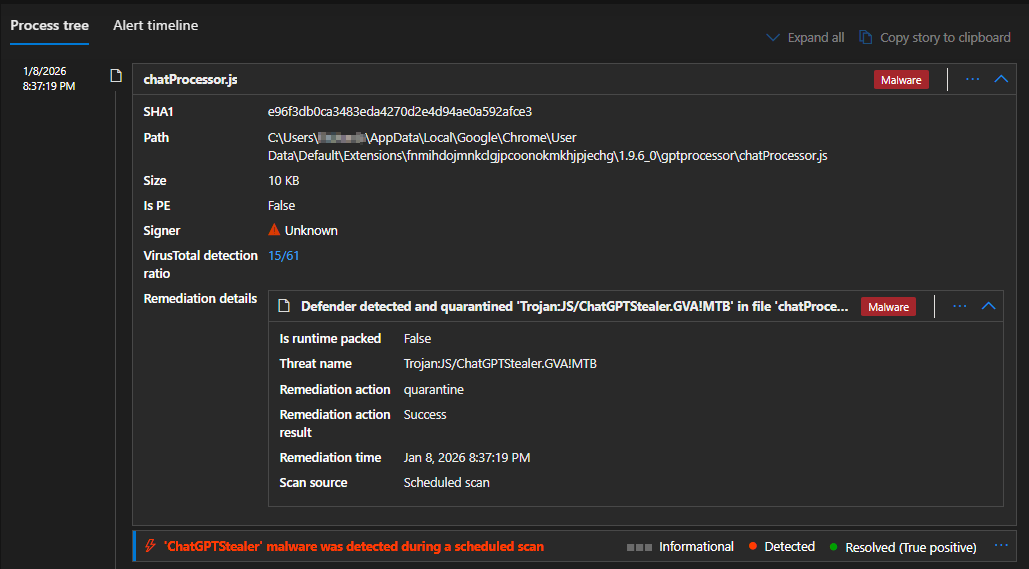
Microsoft Defender detecting and quarantining chatProcessor.js — Trojan:JS/ChatGPTStealer.GVA!MTB (15/61 VirusTotal)
Key Artifacts / Hashes
| Filename | SHA1 |
|---|---|
chatProcessor.js | e96f3db0ca3483eda4270d2e4d94ae0a592afce3 |
setup.html | dfe1619fdd7b0f8113e77f2c7a2cbcbb1f77cdec |
blueBackground.js | 069b3f8de5302997c8fdb549c1f580dd5ff9d895 |
ScriptCache 2f249fb62dc4761c_0 | a2c44a0623cf5b34ef5592b32439fd8ea85dc90f |
ScriptCache b38124e9c537001f_0 | bdac102ff53e701ca9ef998193be5152f17e3ccb |
Incident 2: Multiple Endpoints and Wider Exposure
Chrome extension ID: inhcgfpbfdjbjogdfjbclgolkmhnooop
Versions seen: 1.5.0 / 1.6.0 / 1.6.1
This wasn't limited to one user. Multiple endpoints showed installation evidence, pointing to a repeatable infection pattern.
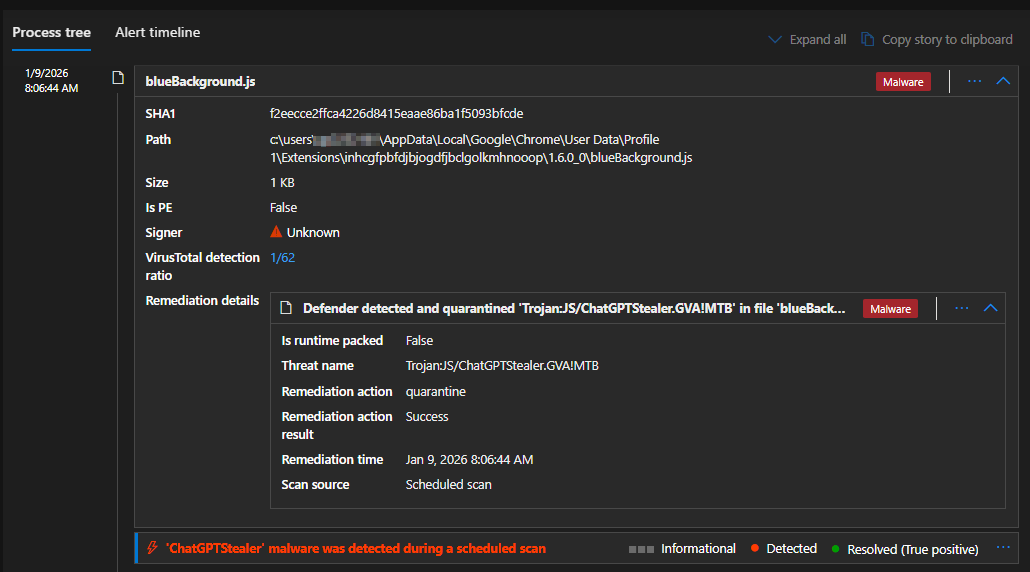
Microsoft Defender detecting blueBackground.js across a second extension ID — confirming wider campaign scope
Key Artifacts / Hashes
| Filename | SHA1 |
|---|---|
blueBackground.js | f2eecce2ffca4226d8415eaae86ba1f5093bfcde |
setup.html | b31dbff1bfaafa84cf51a5248d9027e9202c2f93 |
Incident 3: Phishing Payload Inside Extension Content Scripts
Chrome extension ID: eppiocemhmnlbhjplcgkofciiegomcon (v5.10.3)
Defender detection included: Trojan:JS/Phish!MSR
Key Artifact
| Filename | Size | SHA1 |
|---|---|---|
content.js | 243 KB | 445baa512ca9242a19e17bf665427d0d84ffd031 |
Path: C:\Users\...\Chrome\User Data\Default\Extensions\eppiocemhmnlbhjplcgkofciiegomcon\5.10.3_0\ad-blocker\content.js
Proactive SOC Hunting: Detect This at Scale
This campaign is highly huntable because it leaves consistent artifacts across endpoints, including extension folders, service worker caches, repeatable filenames, and known hashes.
Below is a Microsoft Defender for Endpoint (MDE) Advanced Hunting query to search across a 365-day window for known malicious extension IDs, known SHA1 hashes, common filenames, and typical Chrome extension/cache paths:
let ExtIds = dynamic([
  "fnmihdojmnkclgjpcoonokmkhjpjechg",
  "inhcgfpbfdjbjogdfjbclgolkmhnooop",
  "eppiocemhmnlbhjplcgkofciiegomcon"
]);
let SuspectSha1 = dynamic([
  "e96f3db0ca3483eda4270d2e4d94ae0a592afce3",
  "dfe1619fdd7b0f8113e77f2c7a2cbcbb1f77cdec",
  "069b3f8de5302997c8fdb549c1f580dd5ff9d895",
  "a2c44a0623cf5b34ef5592b32439fd8ea85dc90f",
  "bdac102ff53e701ca9ef998193be5152f17e3ccb",
  "f2eecce2ffca4226d8415eaae86ba1f5093bfcde",
  "b31dbff1bfaafa84cf51a5248d9027e9202c2f93",
  "445baa512ca9242a19e17bf665427d0d84ffd031"
]);
DeviceFileEvents
| where Timestamp > ago(365d)
| where FolderPath has @"\AppData\Local\Google\Chrome\User Data\"
| where FolderPath has_any (@"\Extensions\", @"\Service Worker\ScriptCache\")
| where FolderPath has_any (ExtIds)
   or SHA1 in~ (SuspectSha1)
   or FileName in ("blueBackground.js","setup.html","chatProcessor.js","content.js")
| project Timestamp, DeviceName, ActionType, FileName, SHA1, FolderPath,
  InitiatingProcessFileName, InitiatingProcessCommandLine,
  InitiatingProcessAccountName
| order by Timestamp desc
SOC tip: Prioritize endpoints where results appear in
...\Service Worker\ScriptCache\...(high confidence execution signal)
Hunting Checklist: Quick Indicators
Extension IDs
fnmihdojmnkclgjpcoonokmkhjpjechginhcgfpbfdjbjogdfjbclgolkmhnooopeppiocemhmnlbhjplcgkofciiegomcon
Common Locations
...\Chrome\User Data\*\Extensions\<extension_id>\......\Chrome\User Data\*\Service Worker\ScriptCache\...
Common Filenames
blueBackground.jssetup.htmlchatProcessor.jscontent.js
Defender Threat Names
Trojan:JS/ChatGPTStealer.GVA!MTBTrojan:JS/Phish!MSR
What Organizations Should Do Now
If these extensions were installed, assume: AI chat content may be exposed, browsing/session context may be exposed, and attackers may have enough internal context to conduct follow-on attacks.
Practical Mitigations
- Move to an allowlist model for browser extensions
- Restrict installs to approved publishers/extensions
- Continuous extension inventory + drift detection
- Treat AI prompts as sensitive enterprise data
- Prepare IR workflow for "AI prompt exfiltration" scenarios
- Monitor for follow-on phishing using internal project language
Bottom Line
The browser has become a major attack surface again, and AI extensions have created a new class of data leakage. Attackers aren't only stealing passwords. They're stealing what's arguably more valuable:
Your internal thinking, plans, problems, and context — straight from AI conversations.
Read Part 2: Inside the ChatGPT Stealer Campaign — Live C2 Verification and Technical Teardown →
All findings in this article are based on real incidents from client environments. Client details have been anonymized to protect confidentiality. Technical findings, IOCs, and detection guidance are accurate as of the publication date.